How I build software
Since Claude Code became a thing in my day to day around June 2025, my workflow has gone through many changes.
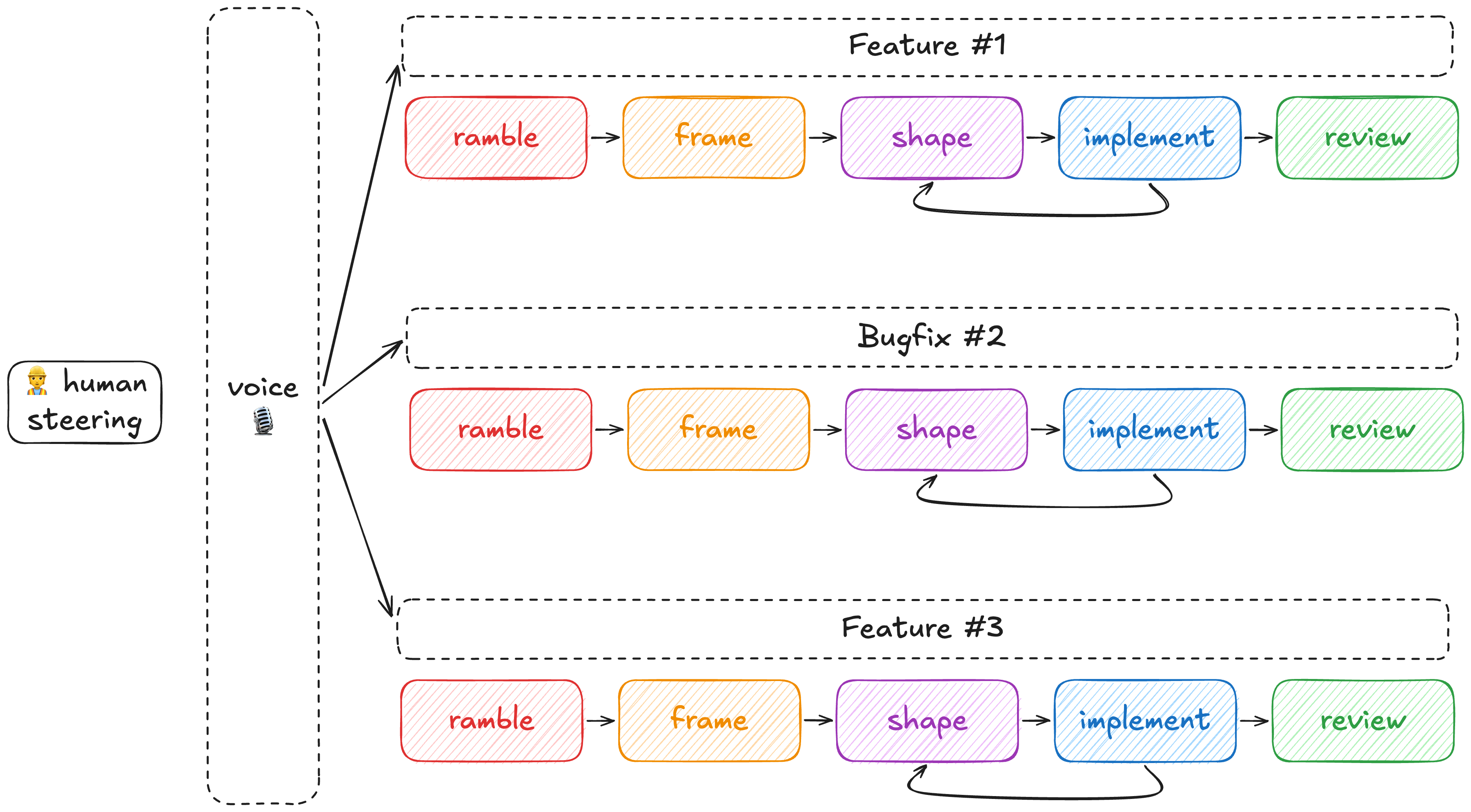
0. The mental model
Mental models are a really simple thing: how you represent reality in your mind. How you, essentially, carve the important things out of a problem and ignore the redundant parts.
Your mental model or, more importantly, the shared mental model of your team or company about a given reality (customer problem, market goal, competitor dominance, technology stack, etc.) is the only thing that matters. AI can blast you with an infinite number of generated artifacts, but if you don’t internalize the model yourself you will never be able to leverage AI.
AI, when used properly, will allow you to update your mental model quicker than before. But you still have to think and internalize the things you build.
1. Rambling
Embrace voice
I start every project by using voice mode either directly in Claude Code or through a local STT model using Muesli, a desktop app for MacOS.
Voice is much quicker than typing and has the advantage of letting your hands (and legs) free to ramble across the room with your AirPods on.
Then I send that transcription to Claude Code without any edits with a prompt like “Here’s my ramble about XYZ, try organizing my thoughts and craft a few questions to pull some threads: [Transcript].”
I read Claude's questions, ramble a few more minutes, sometimes I stop and search for something on the Internet, etc.
Let’s say, to put up an example, I’m rambling about how to create an MCP over my API to provide to my clients. In the same rambling session I can touch many different topics such as: pricing, OAuth, LLM clients, tools surface, agentic tools, observability, auditability, how I should deploy it, etc. The important thing in rambling is crafting the questions rather than the answers.
After rambling, I just ask Claude to save everything to RAMBLING.md in whichever folder I'm in.
2. Organize yourself
When tackling long projects I like to create my worktrees upfront. Worktrees are a really cool abstraction in the git version control system that allow you to create a copy of your repository files scoped to a feature branch.
I usually just ask Claude "Create a folder in my ~/Workspace for project XYZ, start setting up the worktrees for the different repositories involved, move my RAMBLING.md file as well.".
Worktrees are cool because you can have many different copies of your repositories and work in many branches at the same time while you wait for other agents to finish.
3. Framing
Framing is a step of the Shape Up methodology introduced by Ryan Singer where you work around a problem to frame it under your organization and business reality. You somewhat bend the problem to your current mental model, so to speak.
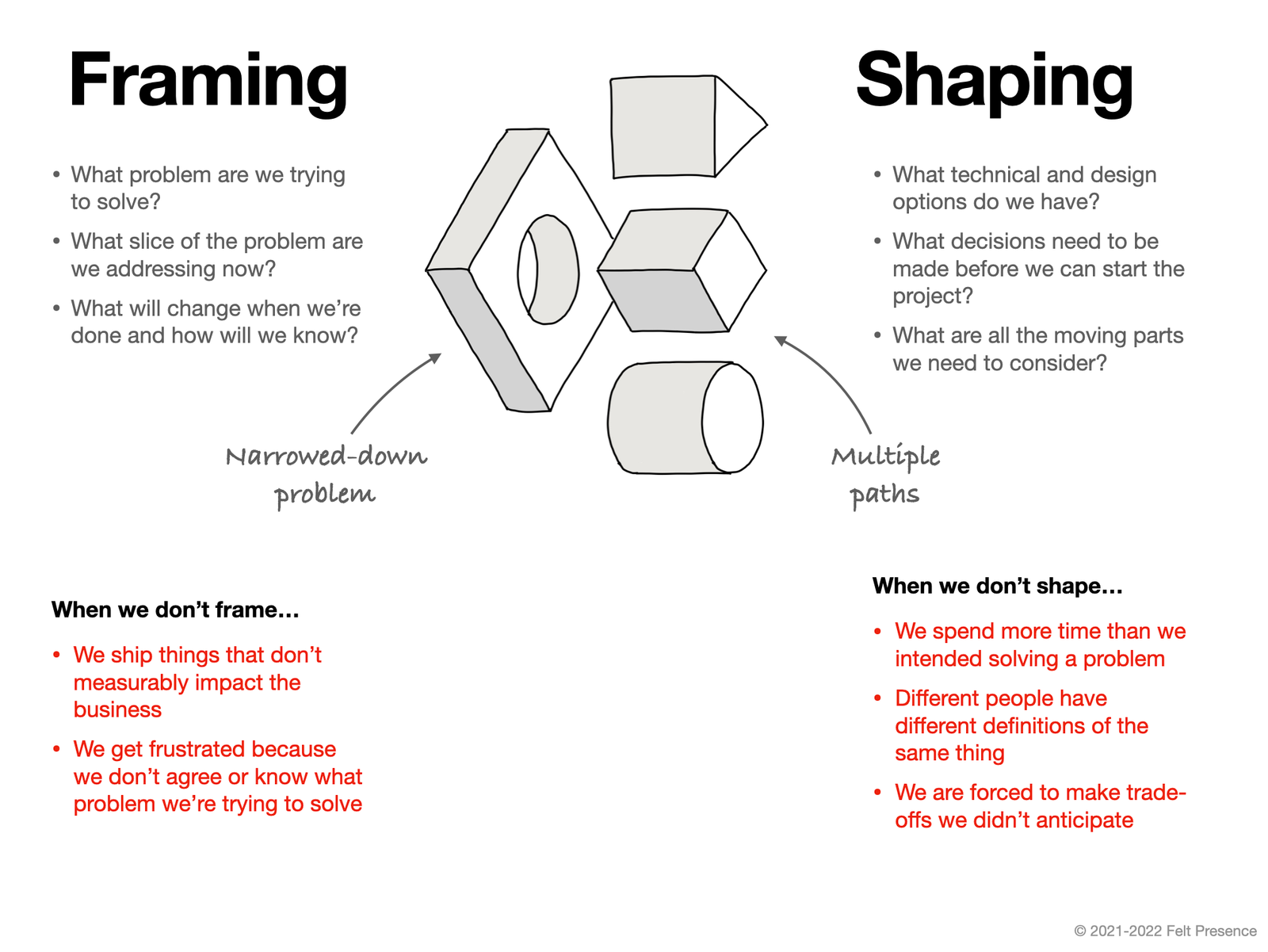
It differs from shaping (or planning) in the sense that it focuses heavily on the problem, it narrows it down.
I love doing this step with AI and voice. I base it on the RAMBLING.md and start working with Claude to understand slices, subproblems, constraints, bigger problems, and so on.
When I finish this step I will have a PRD.md.
4. Shaping
Shaping is just defining a solution to the problem you framed, with a very good level of detail.
I spend most of the time at this phase. I go back and forth with Claude brainstorming solutions to the problem framed, considering its slices, finding which slices make sense to ship first. Trying to find something small.
If you want to ship a feature you have to be the one that understands it end to end. So spend time at this phase. Think of this phase as developing the new mental model around your business problems, your codebase and architecture.
Level of detail
I like my PLAN.md to be to the diff level. I like to see program design as well as UI design exactly before I even start building it. I will usually tell CLAUDE.md to work on prototypes for the UI, give me different options, and go back and forth until the plan has what I exactly want.
Vertical slices
I like to think of my work like vertical slices or phases. Things I can ship in units without having to ship the whole solution at once. I use Claude to think and design these phases.

Sharing with the team
At this point, if you are working on something complex enough, you sometimes will have to take some decisions that will impact the design of the codebase, architecture or data in a way that you need some type of consensus and debate around it.
Invest 20 or 30 minutes putting together a brief RFC, hand-written, to share with your team. They will appreciate it more than a PLAN.md generated by an LLM.
Testing
It is really important that you include in your plans how you want tests to be done, what E2E should be done, what's the evidence that should be present, which test harnesses might be developed and so on. Give Claude a way of testing its own work.
5. Implementation
At this point I have my PLAN.md sorted out with phases, program design, UI design and architectural changes.
I typically spawn a new session, point Claude to the plan and instruct it to work over the first phase using subagents. This tends to be a long session spanning maybe an hour or more if heavy E2E is needed.
Isolated envs
I do all my development locally on a Macbook Pro M5 and it is powerful enough to house 3 or 4 parallel complex features running each one with its own logical PSQL and Redis in Docker container plus webservers and so on.
YOLO mode
To leverage AI you can't be there accepting every action. The industry standard nowadays is using Auto mode which is a safer approach to YOLO mode where you have an adversarial classifier agent that inspects all actions and detects harmful ones.
Taking a little bit of risk is really worth it. But if you need an extra step, different harnesses let you use different sandboxing solutions. I like Claude Code sandbox because it is easy to set up and gives you an extra layer of protection.
Review
When phase 0 is built I will take a look at evidence. See videos of the feature working recorded by the agent. Then, I start looking at the code to spot architectural or program design errors. I can tolerate verbose functions or skip over individual methods that I don't like.
I like to spin up my IDE with the code freshly written and turn on voice transcription to record my review without having to write it. I just point out things I don't like and direct Claude how to fix it. I prefer to do this in a fresh or compacted session.
If the solution is far from being shippable then I will ask Claude to create a phase + 1 section in the plan where we fix phase 0. I repeat steps 4 and 5 until I like it.
6. Code review
Everyone in the team is generating a lot more code, so code reviews compete with programming your own features itself.
The only way to write good code is to have a good understanding of both the problem and the solution design. And, in code reviews, we reviewers evaluate that. We try to judge according to the quality of the solution whether the author's mental model is appropriate.
The thing with LLMs is that now good engineers with deep understanding of business problems and sharp design skills can produce regular code. And by regular code I mean all the nitpick kind of comments we used to leave in MRs.
In my opinion, after the surge of agentic programming, there are two gates I look for in a code review:
- It does not break project rules, conventions or architectural patterns.
- The author's mental model behind the problem and solution is solid and well explained. Either by RFCs, diagrams, a hand-written merge request description or a quick sync.
7. Live on production
A good trick after your feature goes live is to monitor it using agents itself. Connect OpenSearch, Sentry, Slack, ClickUp, PostHog, Metabase, etc. to your agent and tell it to check regularly for usage metrics, bug reports, user feedback and so on.
8. References
- HumanLayer blog and all Dex Horthy's work on Context Engineering.
- Agentic programming by Martin Fowler